













Controls
Space↑ClickTap
Tap for a short jump or hold for a higher jump.
Explore robot-themed Geometry Dash challenges.
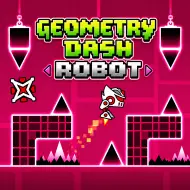
Explore robot-themed Geometry Dash challenges.
Space↑ClickTap
Tap for a short jump or hold for a higher jump.
Geometry Dash Robot focuses on the mechanical character style familiar from Geometry Dash. Robot movement rewards careful attention to when a jump begins and how long a press is held, making it a distinctive challenge for players used to the ordinary cube.
A robot-themed obstacle course can feel deceptively straightforward, but closely spaced platforms and spikes punish unnecessary long jumps. The goal is to control each movement while keeping up with the game's forward pace.
Check the in-game instructions for the exact keys in this browser build. In Geometry Dash-style robot sections, the main button triggers a jump, and holding it can influence jump height. Short taps and longer presses therefore serve different purposes.
The robot form is defined by deliberate jumping rather than sustained ship or wave flight. Reading the available landing space is as important as clearing the obstacle immediately in front of you.
This page hosts an independent browser implementation. Features such as selectable stages, achievements or exact movement physics may differ from the robot mechanic in the official game.
In the official Geometry Dash mechanic, holding the input changes the robot's jump height, making duration as important as the initial press.
Give the robot a short press. If you brush the ceiling, shorten the press on your next attempt. If you land on the spike, hold just a little longer.
 hot
 top
 trending
 top
 trending
 top
 top
 hot
No games match your search.
All games →